Showing posts with label SQL Server. Show all posts

Friday, March 22, 2013

Getting to know the hierarchyid Data Type


In SQL Server 2008 Microsoft added the hierarchyid data type, one of those things that I had in mind but never got to use, till recently...

So I sat down just to play & getting to know how to use it.

Started with my favorite subject: Music Library.

So I Added a sample DB with Artist, Album & Song tables.

MSDN tutorials contained samples where the hierarchy was used in the same table, that's great for an hierarchy where the hierarchy is within the same entity like employees sample (manager is an employee who manages other employees...).

I wanted an hierarchy between different types of entities, so the hierarchy will be handled in the "MusicLibrary" table and the Artist, Album & Song tables will point to it.

The GlobalEntityType table will contain a lookup table for all the entity types:

CREATE TABLE [dbo].[GlobalEntityType](
 [Code] [smallint] IDENTITY(1,1) NOT NULL,
 [Name] [nvarchar](50) NOT NULL,
 CONSTRAINT [PK_GlobalEntityType] PRIMARY KEY CLUSTERED 
(
 [Code] ASC
)
) ON [PRIMARY]
GO

INSERT INTO GlobalEntityType (Name) VALUES ('Artist')
INSERT INTO GlobalEntityType (Name) VALUES ('Album')
INSERT INTO GlobalEntityType (Name) VALUES ('Song')
GO


The MusicLibrary will contain the hierarchy:

CREATE TABLE [dbo].[MusicLibrary](
 [MusicLibraryId] [int] IDENTITY(1,1) NOT NULL,
 [LibraryHierarchyId] [hierarchyid] NULL,
 [LibraryHierarchyLevel]  AS ([LibraryHierarchyId].[GetLevel]()) PERSISTED,
 [EntityTypeCode] [smallint] NULL
) ON [PRIMARY]

GO

ALTER TABLE [dbo].[MusicLibrary]  WITH CHECK ADD  CONSTRAINT [FK_MusicLibrary_GlobalEntityType] FOREIGN KEY([EntityTypeCode])
REFERENCES [dbo].[GlobalEntityType] ([Code])
GO

ALTER TABLE [dbo].[MusicLibrary] CHECK CONSTRAINT [FK_MusicLibrary_GlobalEntityType]
GO

The Artist table:

CREATE TABLE [dbo].[Artist](
 [ArtistId] [int] IDENTITY(1,1) NOT NULL,
 [Name] [nvarchar](50) NOT NULL,
 [MusicLibraryId] [int] NULL,
 CONSTRAINT [PK_Artist] PRIMARY KEY CLUSTERED 
(
 [ArtistId] ASC
)
) ON [PRIMARY]

GO

ALTER TABLE [dbo].[Artist]  WITH CHECK ADD  CONSTRAINT [FK_Artist_MusicLibrary] FOREIGN KEY([MusicLibraryId])
REFERENCES [dbo].[MusicLibrary] ([MusicLibraryId])
GO

ALTER TABLE [dbo].[Artist] CHECK CONSTRAINT [FK_Artist_MusicLibrary]
GO

The Album table:
CREATE TABLE [dbo].[Album](
 [AlbumId] [int] IDENTITY(1,1) NOT NULL,
 [Name] [nvarchar](50) NOT NULL,
 [MusicLibraryId] [int] NULL,
 CONSTRAINT [PK_Album] PRIMARY KEY CLUSTERED 
(
 [AlbumId] ASC
)
) ON [PRIMARY]

GO

ALTER TABLE [dbo].[Album]  WITH CHECK ADD  CONSTRAINT [FK_Album_MusicLibrary] FOREIGN KEY([MusicLibraryId])
REFERENCES [dbo].[MusicLibrary] ([MusicLibraryId])
GO

ALTER TABLE [dbo].[Album] CHECK CONSTRAINT [FK_Album_MusicLibrary]
GO


The Song table:
CREATE TABLE [dbo].[Song](
 [SongId] [int] IDENTITY(1,1) NOT NULL,
 [Name] [nvarchar](50) NOT NULL,
 [MusicLibraryId] [int] NULL,
 CONSTRAINT [PK_Song] PRIMARY KEY CLUSTERED 
(
 [SongId] ASC
)
) ON [PRIMARY]

GO

ALTER TABLE [dbo].[Song]  WITH CHECK ADD  CONSTRAINT [FK_Song_MusicLibrary] FOREIGN KEY([MusicLibraryId])
REFERENCES [dbo].[MusicLibrary] ([MusicLibraryId])
GO

ALTER TABLE [dbo].[Song] CHECK CONSTRAINT [FK_Song_MusicLibrary]
GO


Fill it with some data...and finally start using the hierarchyid to build the hierarchy.


We'll start by adding a root node:

INSERT INTO [dbo].[MusicLibrary]
           ([LibraryHierarchyId])
     VALUES
           (hierarchyid::GetRoot())
GO

Now we'll build an helper stored procedure to add an artist, album & song to the library.

Use the hierarchyid methods (GetRoot, GetAncestor & GetDescendant in this case) to get the last child of the root and add the new artist under that id.

CREATE PROCEDURE [dbo].[spAddArtist]
  @ArtistId AS INT 
 AS

 IF (NOT EXISTS(SELECT ArtistID FROM Artist WHERE ArtistId=@ArtistId AND MusicLibraryId IS NOT NULL))
 BEGIN 

  DECLARE @ARTIST_TYPE smallint = 1

  DECLARE @root AS HIERARCHYID, @hid AS HIERARCHYID,
  @last_child_hid AS HIERARCHYID;

  SET @root = HIERARCHYID::GetRoot();

  SET @last_child_hid =
   (SELECT MAX(LibraryHierarchyId) FROM dbo.MusicLibrary
    WHERE LibraryHierarchyId.GetAncestor(1) = @root);

  SET @hid = @root.GetDescendant(@last_child_hid, NULL);

  DECLARE @MusicLibraryId int

  SET XACT_ABORT ON 
  BEGIN TRAN
   INSERT INTO dbo.MusicLibrary(LibraryHierarchyId,EntityTypeCode)
    VALUES(@hid, @ARTIST_TYPE)

   SET @MusicLibraryId = SCOPE_IDENTITY()

   UPDATE Artist
    SET MusicLibraryId = @MusicLibraryId
   WHERE ArtistId = @ArtistId
  COMMIT TRAN

 END

Similar logic when adding album & song to the library, but this time we'll send the 'parent' artist/album id to the stored procedure:

CREATE PROCEDURE [dbo].[spAddAlbum] 
  @AlbumId AS INT, @ArtistId AS INT
AS

DECLARE @albumHierarchyId AS HIERARCHYID, @artistHierarchyId AS HIERARCHYID,
  @last_child_hid AS HIERARCHYID;

  DECLARE @ARTIST_TYPE smallint = 1
  DECLARE @ALBUM_TYPE smallint = 2

  IF (NOT EXISTS(SELECT AlbumId FROM Album WHERE AlbumId=@AlbumId AND MusicLibraryId IS NOT NULL))
 BEGIN 

   SET @artistHierarchyId = (SELECT LibraryHierarchyId 
      FROM dbo.MusicLibrary
      INNER JOIN Artist ON 
                                                      Artist.MusicLibraryId = MusicLibrary.MusicLibraryId
            AND MusicLibrary.EntityTypeCode = @ARTIST_TYPE
       WHERE Artist.ArtistId = @ArtistId);

   SET @last_child_hid =
  (SELECT MAX(LibraryHierarchyId) FROM dbo.MusicLibrary
   WHERE LibraryHierarchyId.GetAncestor(1) = @artistHierarchyId);

   SET @albumHierarchyId = @artistHierarchyId.GetDescendant(@last_child_hid, NULL);


   DECLARE @MusicLibraryId int

   SET XACT_ABORT ON 
   BEGIN TRAN

    INSERT INTO dbo.MusicLibrary(LibraryHierarchyId,EntityTypeCode)
     VALUES(@albumHierarchyId, @ALBUM_TYPE)

    SET @MusicLibraryId = SCOPE_IDENTITY()

    UPDATE Album
     SET MusicLibraryId = @MusicLibraryId
    WHERE AlbumId = @AlbumId

   COMMIT TRAN
 END

Now use these stored procedures to connect all the entities together:

exec spAddArtist 1
exec spAddArtist 2

exec spAddAlbum 1,1
exec spAddAlbum 2,1

exec spAddAlbum 3,2
exec spAddAlbum 4,2

exec spAddSong 1,3
exec spAddSong 2,3

exec spAddSong 3,4
exec spAddSong 4,4
exec spAddSong 5,4

exec spAddSong 6,1
exec spAddSong 7,1
exec spAddSong 8,1

exec spAddSong 9,2
exec spAddSong 10,2
exec spAddSong 11,2

And final step, lets see how we can query the hierarchy
DECLARE @ARTIST_TYPE smallint = 1, @ALBUM_TYPE smallint = 2, @SONG_TYPE smallint = 3


DECLARE @SampleArtist hierarchyid

SELECT @SampleArtist = MusicLibrary.LibraryHierarchyId
FROM Artist 
  INNER JOIN MusicLibrary ON 
            Artist.MusicLibraryId = MusicLibrary.MusicLibraryId
            AND EntityTypeCode = @ARTIST_TYPE
WHERE ArtistId = 2

-- Albums of specific artist
SELECT Album.*
FROM Album 
  INNER JOIN MusicLibrary ON 
         Album.MusicLibraryId = MusicLibrary.MusicLibraryId 
         AND EntityTypeCode = @ALBUM_TYPE
 WHERE LibraryHierarchyId.IsDescendantOf(@SampleArtist) = 1

 --Songs of specific artist
SELECT Song.*
FROM Song 
  INNER JOIN MusicLibrary ON 
              Song.MusicLibraryId = MusicLibrary.MusicLibraryId 
              AND EntityTypeCode = @SONG_TYPE
 WHERE LibraryHierarchyId.IsDescendantOf(@SampleArtist) = 1


So you may ask: "what do I need this complexity? we can add a reference from song to album, from album to artist and that's it..."

Well...it's not a better solution, just a different one, I can think of two advantages:

1. What if we add a 'single', a 'single' is a song that is a child of an artist not an album.
If we use foreign keys we'll add another key to song pointing the artist table and than the song table would have sometimes an albumId with a value and artistId with null or vice versa - doable but not so elegant.
With hierarchy we can add a song under an artist without adding another key, just relate the song under the required artist...

2. Isn't this elegant :

SELECT CASE 
 WHEN Artist.Name IS NOT NULL THEN 
             Artist.Name
 WHEN Album.Name IS NOT NULL THEN 
             REPLICATE('     ', LibraryHierarchyLevel) + Album.Name
 WHEN Song.Name IS NOT NULL THEN 
             REPLICATE('     ', LibraryHierarchyLevel) + Song.Name
      END AS Name
FROM MusicLibrary
  LEFT JOIN Artist ON Artist.MusicLibraryId = MusicLibrary.MusicLibraryId 
                      AND EntityTypeCode = @ARTIST_TYPE
  LEFT JOIN Album ON Album.MusicLibraryId = MusicLibrary.MusicLibraryId 
                     AND EntityTypeCode = @ALBUM_TYPE
  LEFT JOIN Song ON Song.MusicLibraryId = MusicLibrary.MusicLibraryId 
                     AND EntityTypeCode = @SONG_TYPE
WHERE EntityTypeCode IS NOT NULL
ORDER BY LibraryHierarchyId


Till next time..
Diego

Monday, September 6, 2010

SQL Server performance - querying by date

In every application that includes a database we will probably need to query some table by some date column -

SELECT Id, MyDate
FROM #CompareDates
WHERE MyDate = GETDATE()


Although this is a very simple syntax, I will show you how it can be a performance hit.

We'll start by filling a table with some random dates(and one row of a specific date just to make sure it exists) and add a clustered index on this column.

The data we are looking for is all the rows with today's date.

DECLARE @myNow DATETIME
SET @myNow = '2010-09-06 22:47'

SELECT *
FROM #CompareDates
WHERE MyDate = @myNow


This query will work very fast, but, because the column 'MyDate' contains time and not just date - the result won't be as expected, only rows with the exact date & time will appear.

We can see in the execution plan that it uses 'clustered index seek' and results with one row which is the row we added manually with exact time.


We can try using DATEDIFF to eliminate the time in the column:
SELECT *
FROM #CompareDates
WHERE DATEDIFF(day,MyDate,@myNow)=0


This will get the exact result, but, using a function over the 'MyDate' column causes the sql server to scan the entire index!!


If the column does not contain time, we can eliminate the time in the '@myNow' parameter:
DECLARE @myNowNoTime DATETIME

SET @myNowNoTime = dateadd(dd,datediff(dd,0,GETDATE()),0)

SELECT *
FROM #CompareDates
WHERE MyDate = @myNowNoTime


This will also perform well as the 1st query, but again...what if 'myDate' column contains time??

The solution is to avoid doing functions (like DATEDIFF, DATEADD or any user defined function) over 'MyDate' column.

The solution is very simple - date range.
First I've created two functions that one returns the begining of the day (time will be '00:00:00') and the other the end of the day (time will be 23:59:59:997)
CREATE FUNCTION [dbo].[fnGetBeginOfDay]
(@myDate DATETIME)
RETURNS DATETIME
BEGIN
RETURN CAST(FLOOR(CAST(@myDate AS DECIMAL(12, 5))) AS DATETIME)
END
GO

CREATE FUNCTION [dbo].[fnGetEndOfDay]
(@myDate DATETIME )
RETURNS DATETIME
BEGIN
RETURN DATEADD(ms, -3, DATEADD(day, 1, (dbo.fnGetBeginOfDay(@myDate))))
END
GO


Than the query will look like this:
DECLARE @beginOfDay DATETIME, @endOfDay DATETIME
SET @beginOfDay = dbo.fnGetBeginOfDay(GETDATE())
SET @endOfDay = dbo.fnGetEndOfDay(GETDATE())

SELECT *
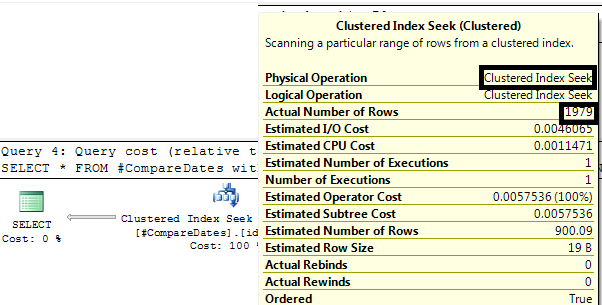
FROM #CompareDates with (index(idx_MyDate))
WHERE MyDate BETWEEN @beginOfDay AND @endOfDay


And the execution plan looks like this, back to the wonderfull 'index seek' and returns the expected amount of rows:


Additional facts:
1. Testing the same queries with NONCLUSTERED index shows that the date range solution is as bad as DATEDIFF - both result with table scan

2. Adding to (1) a table hint (with(index(idx_MyDate))) to both queries shows that while datediff uses 'index scan', date range uses 'index seek' (which is obviously better).

Conclusions:

1. When querying using a date column which is included in an index - use 'date range' solution.

2. If the index is nonclustered - check if a table hint makes the difference.


Till next time....
Diego

Full sample test source code:
--fill table with random dates
CREATE TABLE #CompareDates (Id int identity(1,1), MyDate DATETIME)

DECLARE @myNow DATETIME
SET @myNow = '2010-09-06 22:47'
DECLARE @i int, @myDate DATETIME
SET @i = 0

WHILE @i < 10000
BEGIN
--random date (10x to Ben Nadel for the useful & short function :-)
SET @myDate = CAST(CAST( @myNow AS INT ) -5 * RAND( CAST( CAST( NEWID() AS BINARY(8) ) AS INT ) )AS DATETIME)

INSERT INTO #CompareDates (MyDate)
SELECT @myDate
SET @i=@i+1

IF @i=500
INSERT INTO #CompareDates (MyDate) VALUES(@myNow)
END

CREATE CLUSTERED INDEX idx_MyDate ON #CompareDates(MyDate)

SELECT * FROM #CompareDates

-----TESTING:

--fast, looks for specific date including time, not quite we are looking for..
SELECT *
FROM #CompareDates
WHERE MyDate = @myNow

--exact results, scans entire index
SELECT *
FROM #CompareDates
WHERE DATEDIFF(day,MyDate,@myNow)=0

--if the column does not contain time, you can eliminate time in the parameter
DECLARE @myNowNoTime DATETIME
SET @myNowNoTime = dateadd(dd,datediff(dd,0,@myNow),0)

SELECT *
FROM #CompareDates
WHERE MyDate = @myNowNoTime

--if column contains time, use range
DECLARE @beginOfDay DATETIME, @endOfDay DATETIME
SET @beginOfDay = dbo.fnGetBeginOfDay(@myNow)
SET @endOfDay = dbo.fnGetEndOfDay(@myNow)

SELECT *
FROM #CompareDates with (index(idx_MyDate))
WHERE MyDate BETWEEN @beginOfDay AND @endOfDay

Thursday, June 10, 2010

Executing dtsx on Microsoft SQL 2005 Express with schedule

Let say you need to run scheduled DTS package on Microsoft SQL 2005 Express and
as you probably know there is no SSIS and Agent Services in Microsoft SQL 2005 Express
edition but you can do this job actually very easy :

1.
   Assure that you do have the DTExec util, it should be in
   C:\Program Files\Microsoft SQL Server\90\DTS\Binn folder ,
   if you do not have one means you should install SQL Toolkit .

2.
   Next step is to make a batch file to run the DTS package.
   Create batch file with DTExec formatted command for example
             setlocal
             Set upPath=[Some folder path where you have your package or whatever ]
             Set logFileName=DTS_Batch_Log

             cd "C:\Program Files\Microsoft SQL Server\90\DTS\Binn"

             set startDate=%date%
             set startTime=%time%

             set sdy=%startDate:~10,4%
             set sdm=%startDate:~4,2%
             set sdd=%startDate:~7,2%
             set sth=%startTime:~0,2%
             set stm=%startTime:~3,2%
             set sts=%startTime:~6,2% 0

             DTExec.exe /F "%upPath%\DTS\[MyDTSName].dtsx"
             /MAXCONCURRENT " -1 " /CHECKPOINTING OFF
             /SET "\Package.Variables[My DTS Variable name].Value";
             "[Here is comes the My DTS Variable  value]"
              >> "%upPath%\%logFileName%_%sdy%.%sdm%.%sdd%-%sth%.%stm%.log"
             IF %ERRORLEVEL% == 0 GOTO [Some label ] ELSE GOTO End
             : Some label
                   your code comes here
             : End
                  
   The example above shows how to run DTSX Package from File and Log
   the results of execution to some log file.

3.
   Last step is schedule and Yes there is one in Windows it called " Scheduled
   Tasks" you could find it in System Tools – just create one with call of the batch
   that you created earlier to run dtsx packages.

And that's all you need for the job to be done ;)...

Monday, June 7, 2010

SqlBroker clean up

Testing SqlBroker for the 1st time outside the development environment I realized I did not define the Authorization attribute when creating the objects (messagetype, contract & services) see Asynchronous triggers using SQL Broker for more details.

This mistake filled the queue with over 300,000 messages that were not going anywhere even after I fixed the Authorization.

Good thing I found this on test environment which allowed me to run a short script that cleans up those messages without worrying about the consequences.

BTW, if you were thinking of dropping the objects and rebuild them...tried that - got a weird out of memory message from SQL Server.

Here is the script:

declare @conversation uniqueidentifier

while exists (select 1 from sys.transmission_queue )

begin

set @conversation = (select top 1 conversation_handle from sys.transmission_queue )

end conversation @conversation with cleanup

end


Till next time...
Diego

Monday, May 3, 2010

Pivot in SQL Server 2005


A pivot is a  method of grouping and displaying   data by means of aggregating values -
in  simple words , present one table-valued expression into another table.
Let see what that means in the example below.

Table #tmpBeforePivot representing table of transactions ,
the purpose is to get the transactions summary by each month of year in one row for
each policy .
You could use the case statement but within sql 2005 you got the pivot statement .

We will fill #tmpBeforePivot with dummy data :

create
table #tmpBeforePivot(PolicyKey int,[ValueDate] datetime,Amount  decimal
(18,2))
insert into #tmpBeforePivot(PolicyKey,[ValueDate],Amount) values(1,'2009-01-23',1243.00)

     and so on ... 

And now for the pivot ....


For each month declare in select statement ,column that represent month of year .
The alias such as "Jan","Feb","March"… is for your discretion but columns within [] should
be the same as excepted key in our example Month of year from 1 to 12 .

          SELECT
                 PolicyKey
,    
                 [1]  AS Jan, 

                 [2]  AS Feb,
                 [3]  AS March,
                                  [4]  AS April,    
                 [5]  AS May, 

                 [6]  AS June,
                 [7]  AS Jule,
                 [8]    AS August,
                 [9]  AS September,
                 [10] AS November,

                 [11] AS October,
                 [12] AS December                  
           FROM
                 (
                    SELECT  [PolicyKey],           
                    month([ValueDate])
as ValueDateMonth,            
                    Amount  
      
                    FROM #tmpBeforePivot                   

      
            ) p
                     PIVOT
                             (
    
                           sum(Amount
                               FOR ValueDateMonth IN
                               ([1],[2],[3],[4],[5],[6],[7],[8],[9],[10],[11],[12])
                             ) AS pvt
                  ORDER BY PolicyKey 


 Thats the result view for example above 

Very simple and usefull feature .
For more information look at msdn : Using PIVOT and UNPIVOT